
In my previous External Key Store versus Managed HSM post I claimed Managed HSM was safer, had better SLA support, much higher SLA and the risk of key compromise was lower. Still, here we are: Microsoft announced the exact same feature with the same architecture on Managed HSM (MHSM). Apparently, some customers do require their keys on-premises despite the impact to security and availability.
Let’s start with the initial warnings first. Managing your own HSM that could be responsible for all availability of your data is not something that you take lightly. It requires substantial investments, massive operational overhead and responsibilities. Sovereignty is all nice, but this becomes the single biggest risk in your architecture. DO NOT USE IT IF YOU DON’T HAVE TO
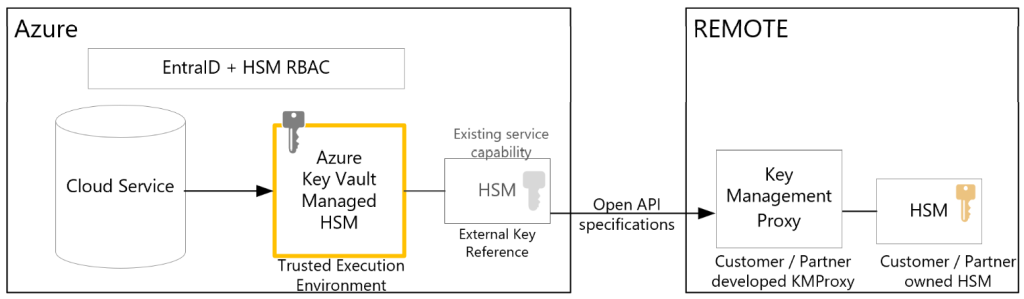
The architecture looks very much like the one we saw in our earlier post on EKM. For server-side-encryption the cloud service still uses a key management service in the cloud (Azure Key Vault Managed HSM) which then uses an external key reference to talk to a proxy that then talks to your own HSM.
The added feature to MHSM is effectively an API. It calls out to the proxy in a standard format to wrap and unwrap the actual data encryption keys. The proxy then translates that into HSM specific calls. So let’s see how that works again in more detail:
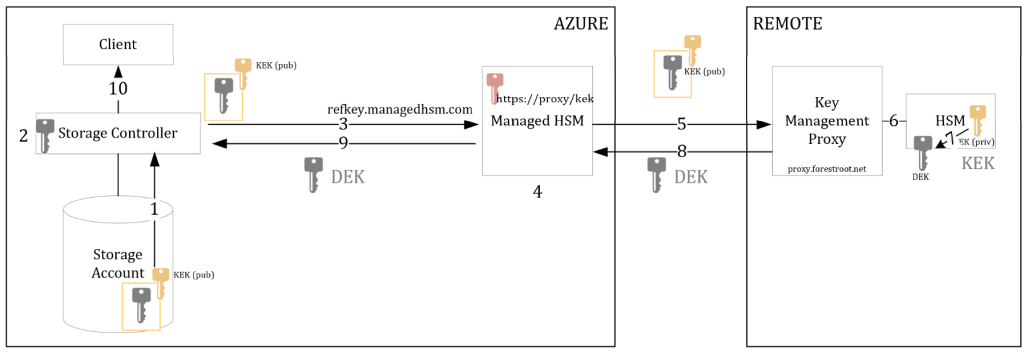
- Your storage account mounts as an application requests data
- The storage controller retrieves the Data Encryption Key (wrapped in the Key Encryption Key)
- This (DEK)KEK combination is sent to the MHSM for an unwrap action. It uses an URL from a reference key in the MHSM.
- The MHSM receives the call and looks up the actual key name (destination URI)
- An API outbound call is made to the destination URI. Mutual TLS happens and the (DEK)KEK is sent to the proxy
- The proxy translates the standard API call to specific HSM language (SDK) and asks the HSM to perform the unwrap action.
- The actual DEK is decrypted with the private key of the KEK and sent back to the proxy.
- The proxy responds to the MHSM API call with the unencrypted DEK
- The MHSM answers the initial call of the storage controller by sending an unencrypted DEK
- Storage account is mounted and ready for use
the DEK is never in clear text, but encrypted in the TLS transmission – see also External Key Store vs Azure Managed HSM – in this case (and to proof my previous blogpost that the proxy has access to the unencrypted DEK) – I configured the proxy to dump the actual encrypted DEK and plaintext DEK as you can see below in the logs.
In action
Theoretics are nice, real-world is better. So, with the help of vibe-coding (hello GitHub Copilot) I managed have Ai make a proxy for me by just sending the API specs (and a bit of back and forth). Now I don’t have my HSM at hand, but for this test, the local certificate store on a Windows Server will have to do. In essence the proxy has a few requirements:
- Mutual TLS authentication
- Send the proxy specs
- Send key metadata
- Key Wrap function
- Key Unwrap function
And that’s it. So let’s start with the security first. Mutual TLS authentication:
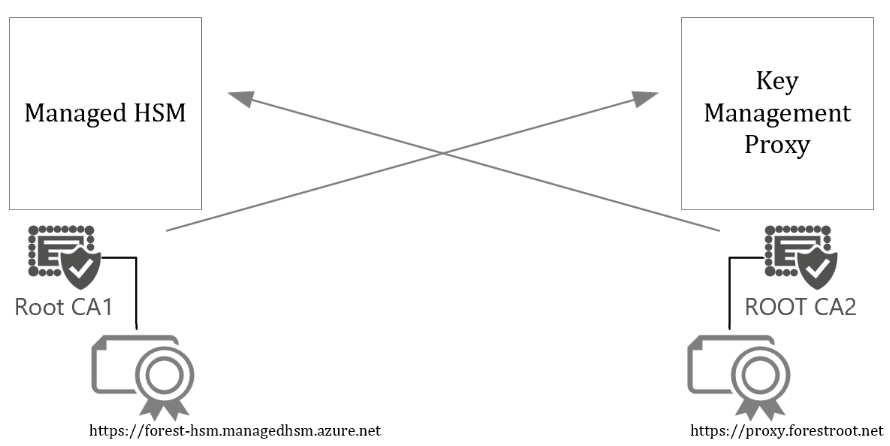
To ensure the components trust each other (and no-one else), mutual TLS authentication is required. Effectively, Managed HSM and the Proxy each get their own “client authentication” certificate signed by a Certificate Authority. For your proxy, you can use (preferred) your own private CA to sign the client certificate. The private CA certificate (without private key obviously) needs to be uploaded to Managed HSM to validate the client certificate. This way, Managed HSM only trusts your signed client certificate in combination with your CA cert.
Managed HSM will send you it’s root CA (public DigiCert Global Root CA) for your server to trust. And your proxy should specifically only allow <yourHSMname>.managedhsmclient.azure.net as a client.
The proxy should also be published on the “internet” on it’s public URL. This means that proxy.forestroot.net needs to have an (public) IP, a DNS entry matching the client certificate (so it needs to be an FQDN), a WAF/protection in front of it and much more. Obviously you might be able to push this to a private network (ExpressRoute) as long as DNS resolving works.
When configuring the external key management connection in Managed HSM, you specify the FQDN of the proxy and provide the Root CA:
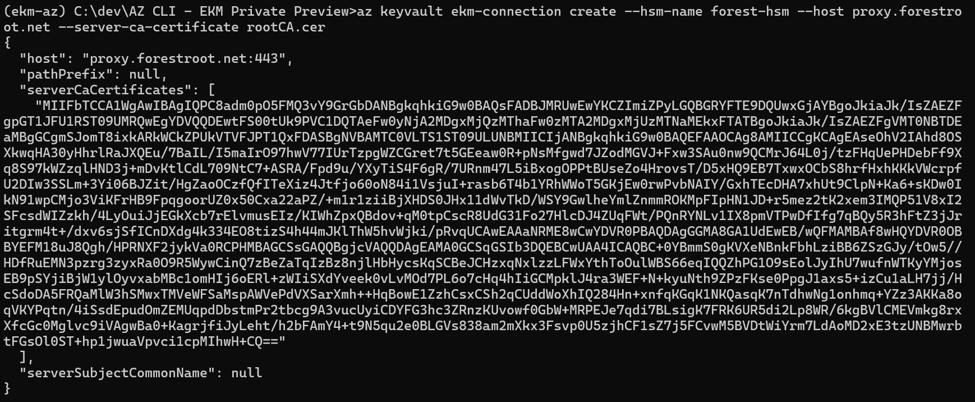
You can request the Managed HSM to provide it’s Root CA (although its public anyway) and request the Client Cert Distinguished Name you can use to limit the authentication to your proxy, and then request the details of your proxy from the Managed HSM and validate the connection:

The proxy here responds to the required fields such as API version, the product, vendor, name etc.
Reference Keys
Now that we have the connection, let’s see it in action. I set up a storage account with a managed identity and created a reference key in Managed HSM.
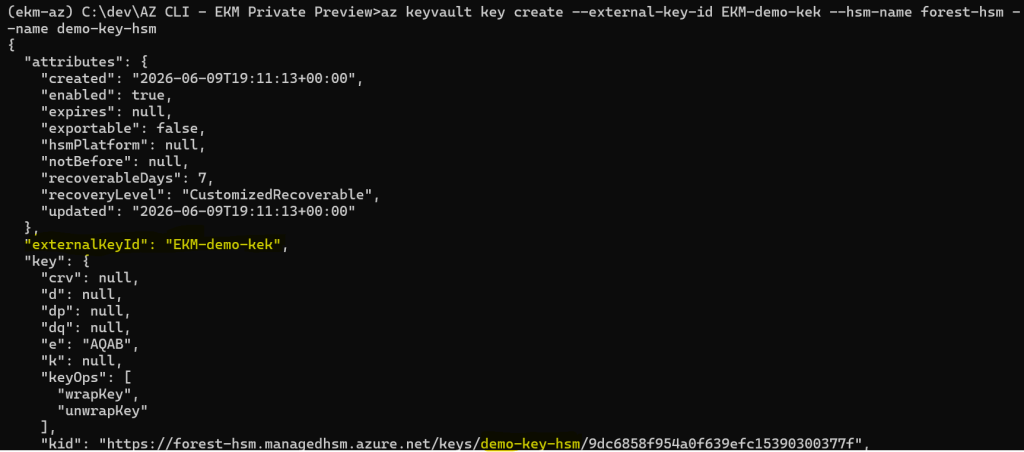
That reference key links two things: a key URI in Managed HSM and an external endpoint URI exposed through the proxy.
- Managed HSM key URI: https://forest-hsm.managedhsm.azure.net/keys/demo-key-hsm
- Proxy key URI: https://proxy.forestroot.net/EKM-demo-kek
The storage account uses the Managed HSM reference key. Permissions on who can use that key (storage account identity) needs to be setup via the Managed HSM RBAC control plane. But any cryptographic operation against the key is not executed locally. Instead, it is transparently forwarded through the external key API to the proxy endpoint.
On the proxy side, I have an on-premises key — EKM-demo-kek — acting as the Key Encryption Key (KEK). This key is responsible for protecting the Data Encryption Key (DEK) used by the storage account in Azure.
So effectively:
- Azure Storage thinks it’s using a Managed HSM key
- Managed HSM offloads the wrap/unwrap to the proxy via the API call
- The actual cryptographic operation happens on-premises
- The KEK never leaves your environment
Wrap / Unwrap
What does the actual process then looks like? Well.. as soon as we enable CMK on the storage account, using the demo-key-hsm in Managed HSM we see the following:
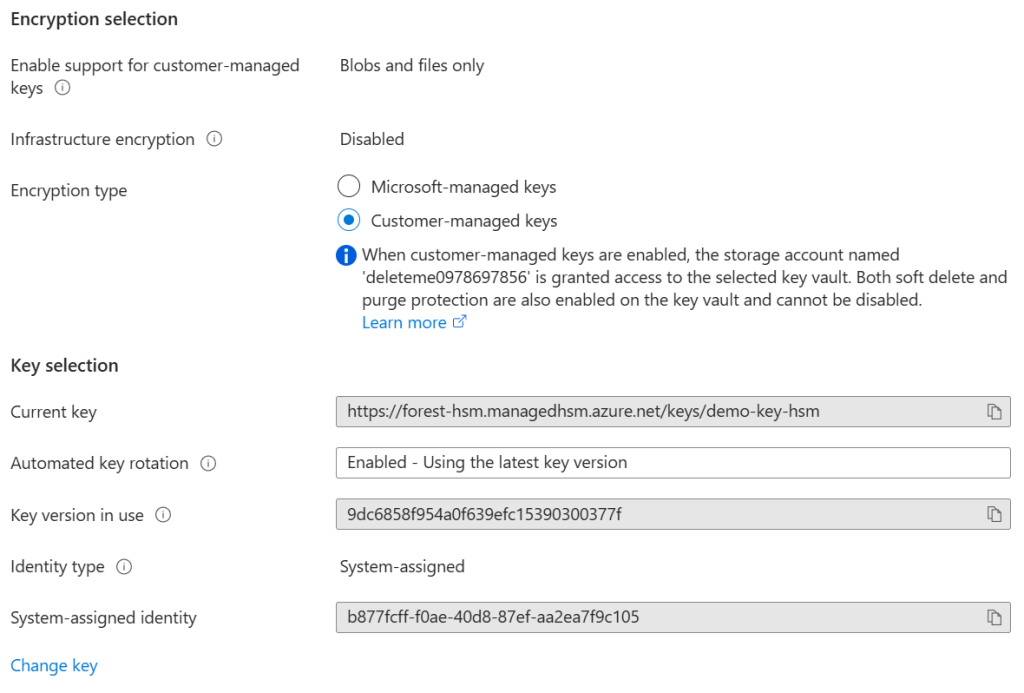
Initially when clicking save, the Storage Account will query our Managed HSM (which in turns forwards that query to my proxy)
HTTP/1.1 POST https://proxy.forestroot.net/EKM-demo-kek/metadata?api-version=0.1-preview - application/json 154
Where the response is effectively the information of the Key, and the operations it supports:
AUDIT response.outbound: {“timestampUtc”:”2026-06-09T19:11:13.5090704+00:00″,”stage”:”response.outbound”,”payload”:{“statusCode”:200,”headers”:{“Content-Type”:”application/json; charset=utf-8″},”body”:”{\u0022key_type\u0022:\u0022RSA\u0022,\u0022key_size\u0022:2048,\u0022key_ops\u0022:\u0022wrapKey\u0022,\u0022unwrapKey\u0022],\…..}”}}
Next is the actual wrapping of the DEK:
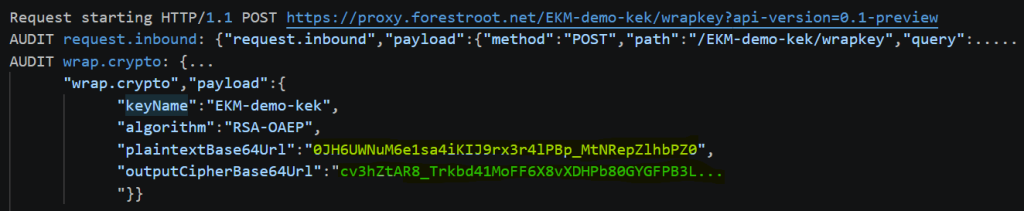
This part gets a bit more technical, but the flow is actually straightforward. A Base64-encoded RSA key (DEK) is sent to the proxy (yellow). The proxy then wraps it using the on‑premises Key Encryption Key (EKM-demo-kek as per the request), and returns the encrypted (DEK)kek (in green).
From there, the system performs two unwrap operations:
- A validation step — to confirm the proxy can successfully decrypt the key material
- The actual unwrap — used to retrieve the Data Encryption Key (DEK) and unlock the storage account
In both calls, you can clearly see the behavior:
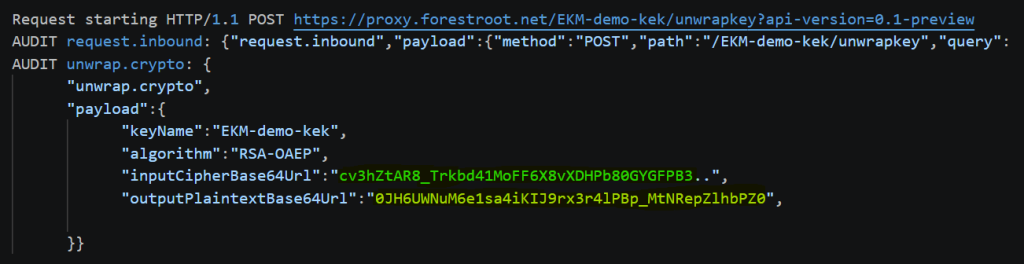
- The request contains the encrypted (green) DEK
- The response returns the decrypted (yellow) DEK
Identity as security
!Important security consequence!
There is one critical implication you need to be aware of: “your HSM has no awareness of who is actually using a key”
All keys exposed through your proxy must allow wrap/unwrap operations for any request coming from Azure through the proxy. The external key API (specification) does not forward the original caller identity or the specific reference key context.
That means your on-prem HSM:
- Cannot distinguish between services or workloads
- Cannot enforce per-service or per-application access controls
- Every authorized call looks the same at the HSM level
All access control decisions are effectively pushed upstream into Managed HSM RBAC. So if you were expecting your HSM to enforce fine-grained usage policies — it won’t. It’s acting as a cryptographic endpoint, not an identity-aware gatekeeper.
mTLS trusts?
My other critique is around the Managed HSM-to-proxy client identity. The proxy authenticates Managed HSM using a Microsoft-managed client certificate, validated through the configured subject/common name and issuing chain. Given the inner workings of Managed HSM, certificate fingerprints cannot be used. While this is consistent with the trust model commonly adopted across the cloud industry, it still means customers are ultimately relying on Microsoft’s certificate issuance and lifecycle controls for the caller identity rather than establishing an independently controlled trust anchor.
This is a subtle but important distinction that is often overlooked in discussions around external key management. The external HSM gives customers custody and control of the KEK, but it does not provide sovereignty over the KMS identity plane itself. The cloud KMS remains a provider-operated service, and the identity used to access the customer-operated proxy remains provider-controlled. That said, Azure’s implementation is arguably stronger than comparable offerings from AWS and Google because Managed HSM runs on Confidential Computing technology, providing hardware-backed isolation and attestation for the service itself. However, even with those protections, the trust model for the caller identity remains rooted in Microsoft-operated infrastructure and Microsoft-managed certificates.
For that reason, I would have preferred an explicit instance-bound client identity model: for example, a unique client certificate or key pair generated per Managed HSM instance, ideally with customer-visible pinning semantics and a well-defined rotation process, or even the option for customers to supply their own client certificate for mTLS authentication. Such an approach would create a more explicit 1:1 trust relationship between the EKM proxy and a specific Managed HSM pool, making the security boundary easier to reason about and reducing the risk of the trust model being broader than intended.
The proxy
My proxy I created with AI vibe coding is super simple. It uses the local computer certificate store for the Key Encryption Keys, so not a real HSM. But good enough for demo purposes. If you want to use it, please check my github repository (github.com/RZomermanMS) and make sure to read the README file. It can host as the proxy, but also create the KEK keys.
Summary
External key management being available in Managed HSM — and therefore across Microsoft Azure and M365 services — opens up new architecture options. The real question, however, is whether you should use it, or if you are required to. In most cases, the answer is no.
EKM gives you hard control over key material, with the Key Encryption Key (KEK) never leaving your HSM. It also aligns well with sovereignty and compliance requirements, and enforces a clear separation of duties: Azure operates the data, while you retain full control over the keys. On top of that, it enables a bring‑your‑own‑HSM model without breaking the native Azure service experience.
But this doesn’t come for free. You take on significantly more responsibility, and more importantly, you effectively remove the SLAs of any Azure service that depends on your external key infrastructure. You’re trading platform guarantees for control — and in return, you only gain a marginal increase in trust, while shifting operational risk onto yourself.
At its core, External Key Management allows Azure services to use encryption keys that never reside in Azure. Instead of executing cryptographic operations inside Azure Key Vault or Managed HSM, those operations are delegated to an external system — typically an on‑premises HSM — via a proxy using the External Key API. From the perspective of the Azure service, nothing changes: it still references what appears to be a normal key in Managed HSM, even though the actual cryptographic operation happens outside Azure.